

Social media caught another wave of AI nostalgia in early September 2026, as people across Facebook, Instagram, X, and TikTok fed selfies into generative AI tools asking for a version of themselves shot decades earlier, rebuilt lighting, wardrobe, and film grain around their actual face.
This isn’t the first AI trend to move this fast, and it won’t be the last. The same rhythm repeats every time: a trend starts, app downloads spike within hours, and attention moves on just as quickly. That predictability is exactly what makes these moments profitable for bad actors too. TrendLife ran a simulation to see how that plays out, from the first ad to the first charge.
Why these trends keep getting exploited
The same handful of tactics show up almost every time a photo or video trend goes viral:
- Fleeceware: free trial apps that quietly convert to weekly or annual charges, usually hidden behind a “free filter” hook.
- Trojanized clones: sideloaded copies or lookalike listings that reuse a trending app’s branding while bundling malware, adware, or credential stealers.
- Data overreach: apps that ask for contacts, precise location, or full photo library access with no real functional need, then monetize or share what they collect.
- Buried consent terms: broad, long-term licenses to your uploaded photos, undisclosed use of images as AI training data, and vague rules on how long your data is kept.
- Fake ad landing pages: sponsored search and social ads that mimic the real trending app to collect payment details or push malicious downloads.
- Face swap misuse: even legitimate looking tools can produce results, or run on models, that get repurposed for impersonation, non-consensual imagery, or scam videos.
We simulated the journey ourselves
To see how this plays out for an ordinary user, TrendLife walked through the full path: from first seeing the trend to getting charged, using one of the apps riding the current wave as a test case.
Stage 1: First contact
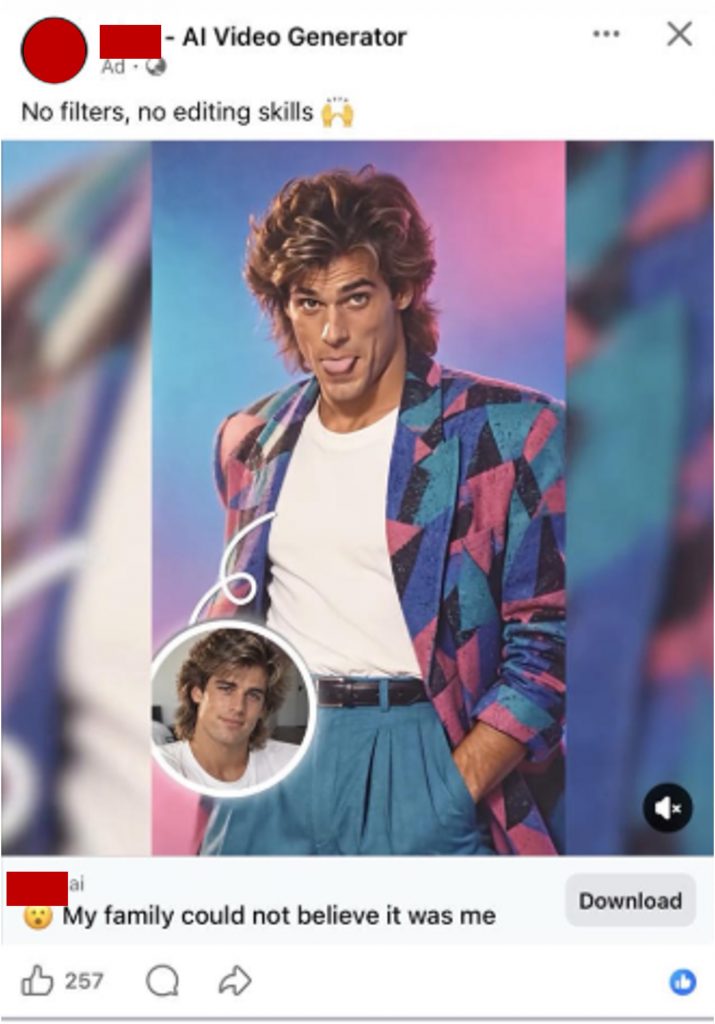
Scrolling a normal feed, our tester saw several 1980s AI transformations from friends and family. Within minutes, the feed’s algorithm began surfacing more of the same, followed by ads for AI apps on both iOS and Android promising an easy way to join in. The ads make the process look effortless, which is what makes them convincing to younger users and anyone unfamiliar with AI tools.
Stage 2: Trust building
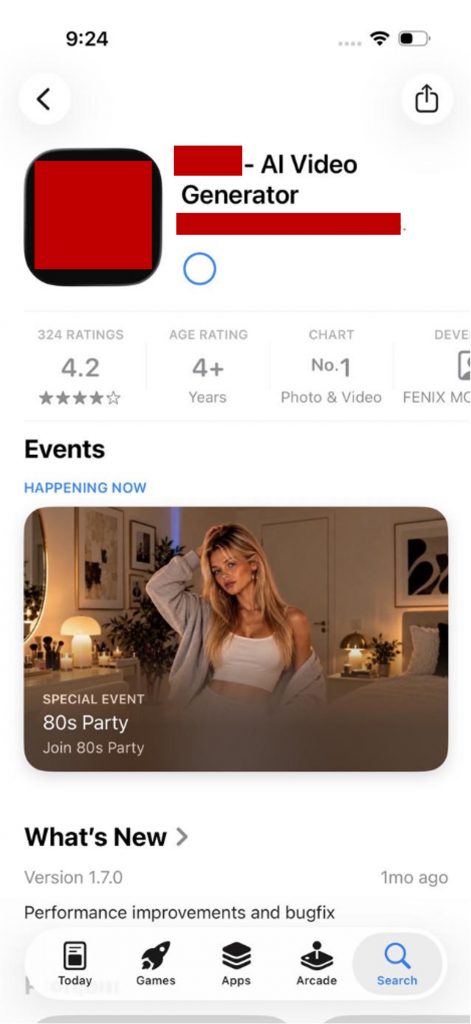
Tapping the ad led straight to an official App Store or Play Store listing rather than a sketchy sideload. A 4.5 to 5 star rating and an advertised free trial lowered the guard even further, before a single tap to install.
Stage 3: The hook
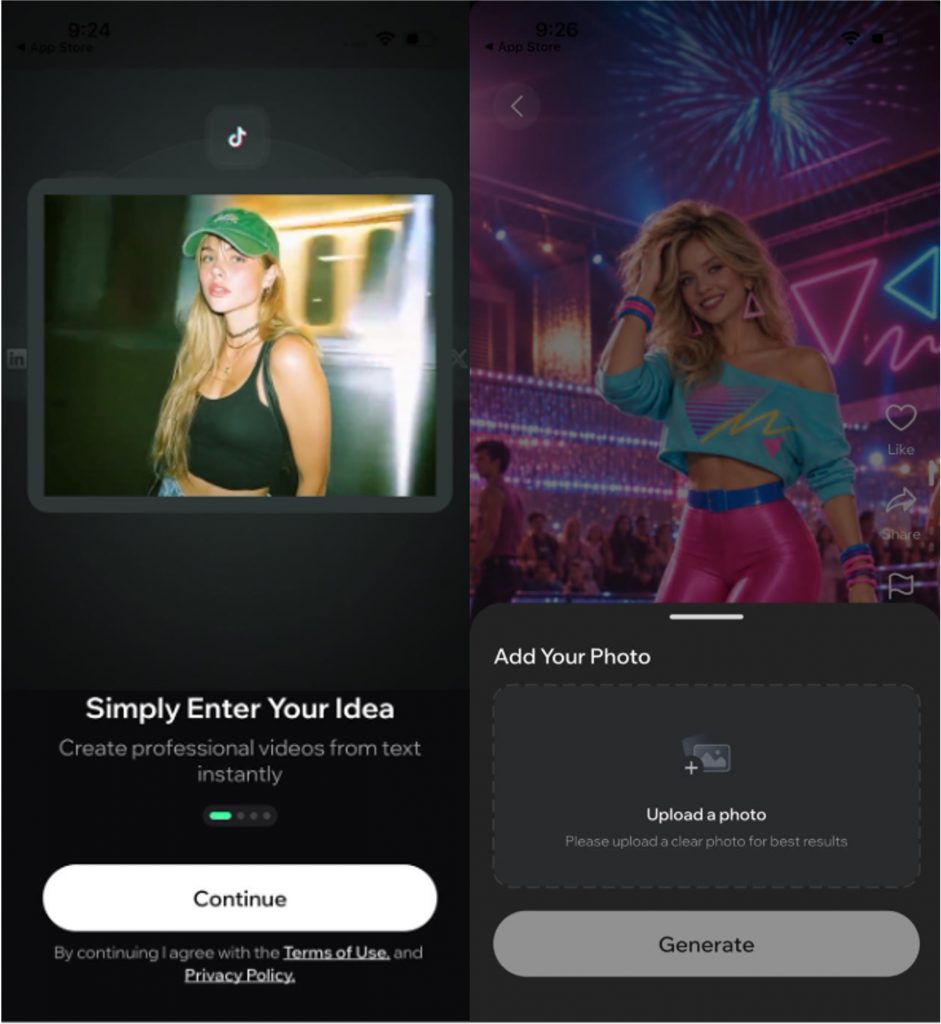
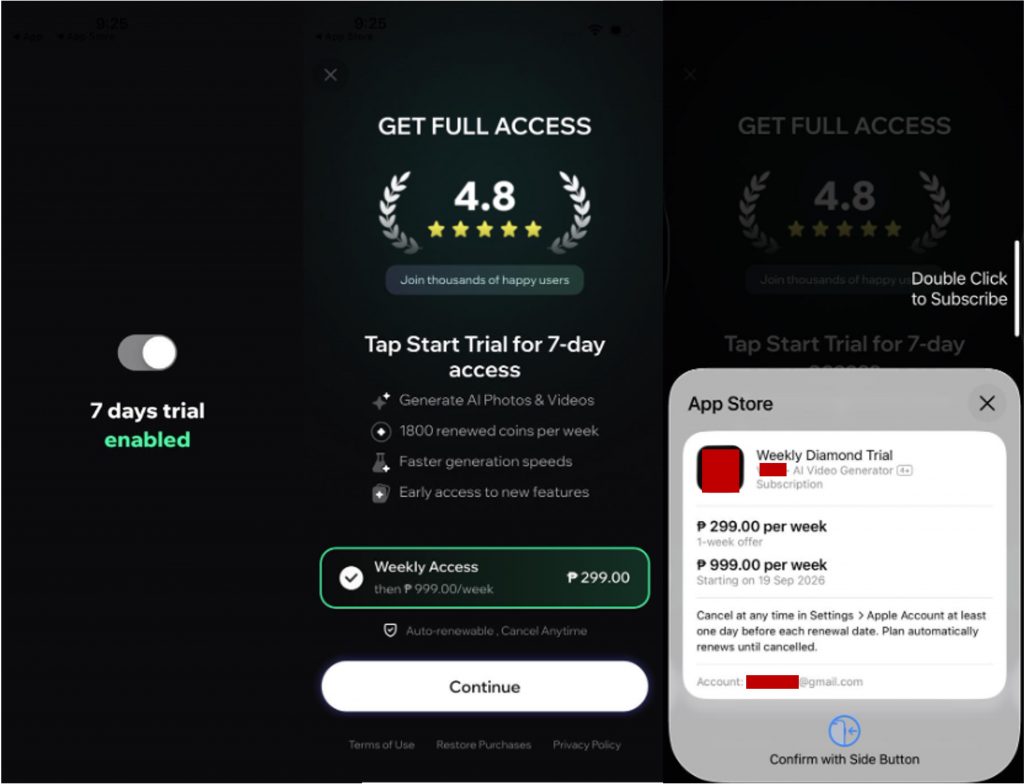
After install, the app required signup before unlocking any feature, framed as a “7 day free trial.” The trial screen switched immediately to a subscription page. The only visible button was “Continue,” with no way to proceed without moving toward payment. Selecting a template and uploading a photo triggered the same subscription screen again. Confirming at the App Store checkout revealed a recurring weekly subscription, with the price shown at that final step, but by the time our tester noticed it, the charge had already gone through.
Stage 4: The exit
The charge was billed as non-refundable. Reaching support led nowhere: requests went unanswered, or the response redirected to a generic platform refund policy instead of addressing the actual complaint.
What the app audit turned up
TrendLife reviewed twenty apps riding this trend and scored each one for risk. The score weighed three things: how often reviewers reported billing deception, how much data the app collected relative to its function, and how far its permission requests strayed from its stated purpose. We’re not naming individual apps here since app store listings and developer ownership can shift quickly, but the pattern across the sample was consistent enough to be worth sharing.
Eight of the twenty apps, 40 percent, scored high risk. Five scored medium, three scored low, and four didn’t have enough review data yet to score. What stood out most: the star ratings gave almost no warning. High-risk apps sat between 4.0 and 4.6 stars, the same range as several low-risk apps. Reading the actual review text was the only signal that reliably separated the two groups. Several high-risk apps had 80 to 100 percent of their negative reviews specifically describing misleading trial terms or unauthorized charges.
Permissions and data collection followed a pattern too. Camera and photo library access was expected across the board. But many high-risk apps went further, requesting precise location, contacts, device identifiers used for ad tracking, and in several cases explicit collection of facial or biometric data with privacy policies that stayed vague on how long that data is kept or whether it gets reused.
One more thing worth checking: in our sample, more than one high-risk app turned out to be made by the same developer, just released under a different app name. A new name and icon on the surface can still mean the same company is holding your data, so check the developer name in the app store listing, not just the app’s name.
Red flags to watch for
- A high rating with bad reviews underneath: a strong star average doesn’t tell you what the actual complaints say. Read the recent reviews, not just the score.
- A trial screen that skips the trial: if the only button on a “free trial” screen leads toward a paid confirmation, that’s not really a trial.
- Pricing that appears only at the last screen: if the weekly or annual cost only shows up on the final purchase confirmation, that’s a deliberate design choice, not an oversight.
- Permission requests that don’t match the app’s job: a photo filter app asking for your contacts or precise location has no functional reason to need either.
- Support that goes quiet after billing: if a company answers fast before you pay and goes silent after, that’s a signal worth remembering.
Want to join the trend anyway? Here’s the lower-risk way
The safest move is also the simplest: skip the unfamiliar app entirely. The surprise weekly billing, the permission overreach, and the vague data retention all trace back to the same decision: installing an app you can’t fully vet just to try a filter for five minutes.
If you want that same peace of mind extended to the rest of your household, that’s what Kaleida, TrendLife’s family AI, is built for: one trusted app covering everyone’s devices, instead of everyone downloading a different unverified one every time a new trend goes viral.
How to protect yourself
- Read the actual subscription terms on the trial screen before tapping anything.
- Check the app’s reviews for recent complaints about billing, not just the overall star rating.
- Check the developer name in the store listing, and search it separately if something feels off.
- Set a calendar reminder to cancel a trial before it converts, and cancel through your App Store or Play Store account settings directly.
- Deny permissions that don’t match the app’s stated purpose. Most photo and video tools don’t need contacts or precise location.
- Check the privacy policy for how long facial or biometric data is kept and whether it’s used for anything beyond generating your result.
- If you’re billed unexpectedly, screenshot the confirmation page and dispute the charge with your card issuer or app store support.
Trends like this one will keep coming back under new names and new decades. The pattern behind them stays remarkably consistent, which means the same habits, checking reviews before you download, reading the trial screen before you tap continue, and watching what permissions you grant, will keep working no matter what the next viral filter looks like.
0 Comments
Other Topics
You Might Also Be Interested In...


